Tip: Preventing Respondents from Listing the Same Person Multiple Times
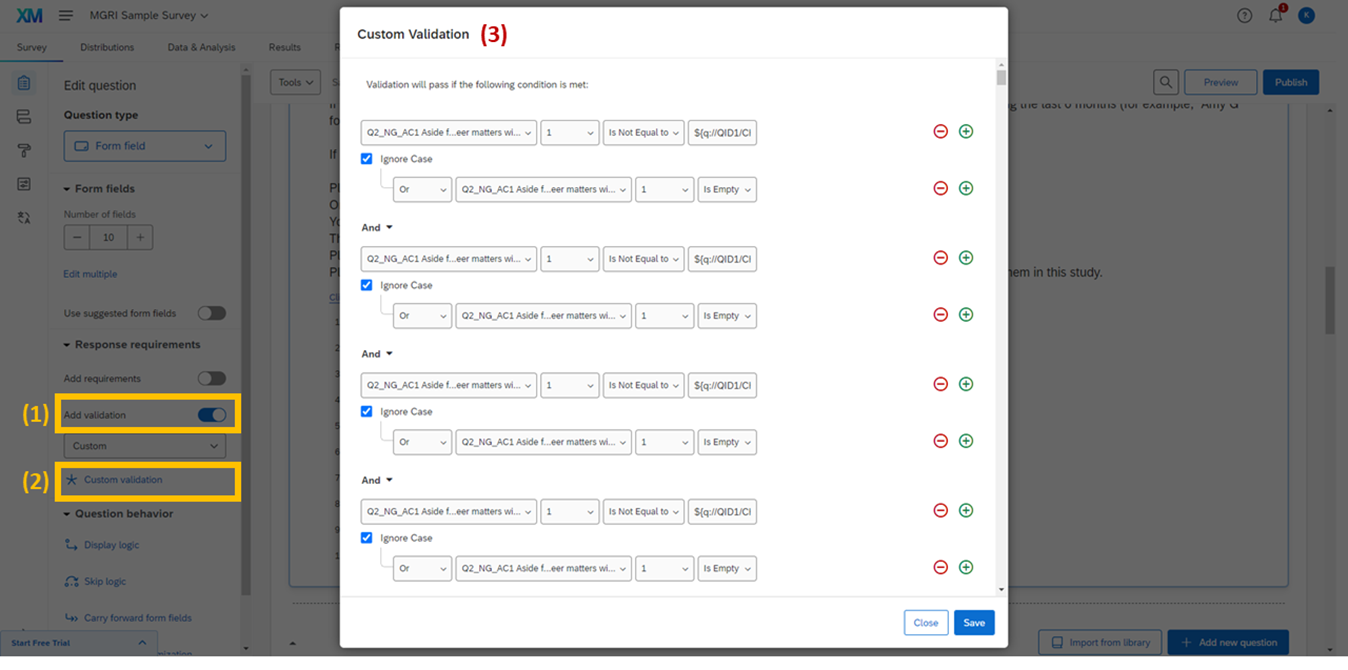
Setting up custom validation on the IM name generator to prevent duplicate entries
The survey prompts say, "enter names that you have not listed before," but there could be cases in which respondents list duplicate names. In order to prevent this, we can set up a validation logic that only allows unique answers for each name generator field.
Go back to the IM generator question, and toggle "Add validation" on the left.
Click "Custom validation."
Set up the validation logic for the IM generator (Q1_NG_IM1).
The purpose of this validation function is to make sure the value of every field in this generator is either (a) empty or (b) is not equal to other fields available in the generator. Therefore, the logic should look as follows:
| Logic level 1 (between logic) |
Logic level 2 (within logic) |
Type | Name | Field Name | Condition Type | Condition Value |
|---|---|---|---|---|---|---|
| And | Question | Q1_NG_IM1 | 1 | Is Not Equal to | ${q://QID1/ChoiceTextEntryValue/2} |
|
| Or | Question | Q1_NG_IM1 | 1 | Is Empty | ||
| And | Question | Q1_NG_IM1 | 1 | Is Not Equal to | ${q://QID1/ChoiceTextEntryValue/3} |
|
| Or | Question | Q1_NG_IM1 | 1 | Is Empty | ||
| And | Question | Q1_NG_IM1 | 1 | Is Not Equal to | ${q://QID1/ChoiceTextEntryValue/4} |
|
| Or | Question | Q1_NG_IM1 | 1 | Is Empty | ||
| … (continued for all field pairs) … | ||||||
| And | Question | Q1_NG_IM1 | 8 | Is Not Equal to | ${q://QID1/ChoiceTextEntryValue/9} |
|
| Or | Question | Q1_NG_IM1 | 8 | Is Empty | ||
| And | Question | Q1_NG_IM1 | 8 | Is Not Equal to | ${q://QID1/ChoiceTextEntryValue/10} |
|
| Or | Question | Q1_NG_IM1 | 8 | Is Empty | ||
| And | Question | Q1_NG_IM1 | 9 | Is Not Equal to | ${q://QID1/ChoiceTextEntryValue/10} |
|
| Or | Question | Q1_NG_IM1 | 9 | Is Empty | ||
Go to the AC name generator (Q2_NG_AC1). Set up validation logic there as well.
Here, we want to make sure the value of every field in this generator is either (a) empty or (b) is not equal to other fields available in the generator and (c) is not equal to other fields available in the previous generator (Q1_NG_IM1). Therefore, the logic should look as follows:
| Logic level 1 (between logic) |
Logic level 2 (within logic) |
Type | Name | Field Name | Condition Type | Condition Value |
|---|---|---|---|---|---|---|
| And | Question | Q2_NG_AC1 | 1 | Is Not Equal to | ${q://QID2/ChoiceTextEntryValue/2} |
|
| Or | Question | Q2_NG_AC1 | 1 | Is Empty | ||
| And | Question | Q2_NG_AC1 | 1 | Is Not Equal to | ${q://QID2/ChoiceTextEntryValue/3} |
|
| Or | Question | Q2_NG_AC1 | 1 | Is Empty | ||
| … (continued for all AC-to-AC field pairs) … | ||||||
| And | Question | Q2_NG_AC1 | 9 | Is Not Equal to | ${q://QID2/ChoiceTextEntryValue/10} |
|
| Or | Question | Q2_NG_AC1 | 9 | Is Empty | ||
| And | Question | Q2_NG_AC1 | 1 | Is Not Equal to | ${q://QID1/ChoiceTextEntryValue/1} |
|
| Or | Question | Q2_NG_AC1 | 1 | Is Empty | ||
| And | Question | Q2_NG_AC1 | 1 | Is Not Equal to | ${q://QID1/ChoiceTextEntryValue/2} |
|
| Or | Question | Q2_NG_AC1 | 1 | Is Empty | ||
| … (continued for all AC-to-IM field pairs) … | ||||||
| And | Question | Q2_NG_AC1 | 1 | Is Not Equal to | ${q://QID1/ChoiceTextEntryValue/10} |
|
| Or | Question | Q2_NG_AC1 | 1 | Is Empty | ||
| And | Question | Q2_NG_AC1 | 2 | Is Not Equal to | ${q://QID1/ChoiceTextEntryValue/1} |
|
| Or | Question | Q2_NG_AC1 | 2 | Is Empty | ||
| … (continued for all remaining AC field × IM field pairs) … | ||||||
| And | Question | Q2_NG_AC1 | 10 | Is Not Equal to | ${q://QID1/ChoiceTextEntryValue/10} |
|
| Or | Question | Q2_NG_AC1 | 10 | Is Empty | ||